TanStack Start doesn't ship an opinion about how to organize your src
folder, which is both the appeal and the risk. Nothing stops you from putting
every component in one components folder and every hook in one hooks
folder — it works fine until the app has forty routes, and then every folder
is a flat list you scroll through to find anything, and nobody can tell which
components are shared and which only make sense inside one feature.
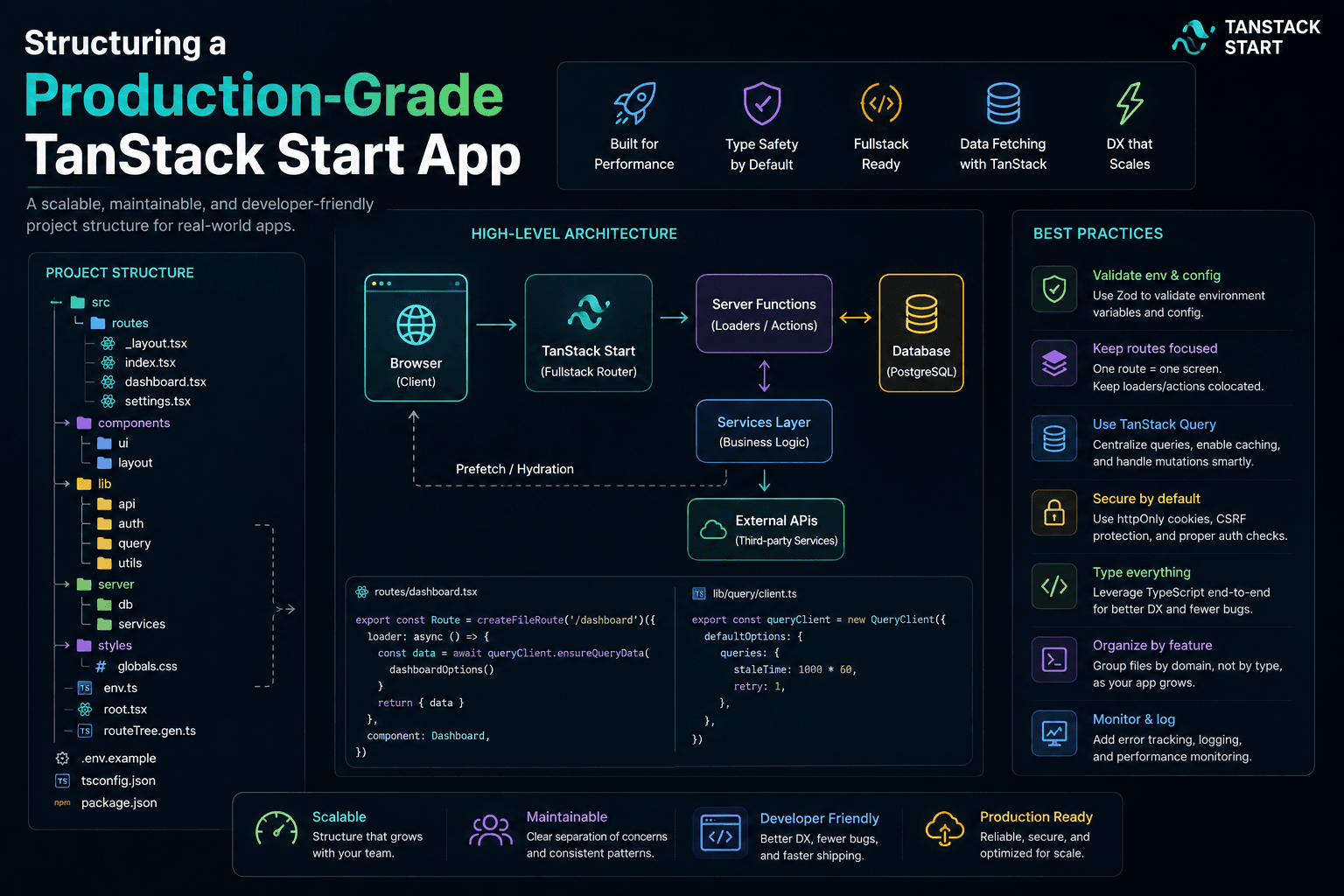
This is the structure I actually reach for once a TanStack Start app is
heading toward production rather than staying a prototype — organized around
features, with routes kept deliberately thin, a dedicated services
layer for server communication, and a small set of shared primitives that
earn their place in shared rather than accumulating there by default.
The problem with structuring by type
The instinct most people start with is grouping by technical type:
src/
  components/
  hooks/
  pages/
  services/
This works at small scale and breaks down predictably as the app grows: to
understand "how does password reset work," you're now opening four unrelated
top-level folders and hunting for the pieces that belong to that one feature.
Nothing tells you which hook in hooks/ is used by one page versus five.
Deleting a feature means hunting down its files across the whole tree instead
of deleting one directory.
Grouping by feature inverts this: everything related to one piece of product behavior lives together, and the top-level folders describe your product, not your framework.
The top-level shape
1src/
2components/     # Cross-feature UI: layouts, design system, shared widgets
3configs/        # Route paths, query/mutation keys, endpoints, site config
4features/       # Feature modules — the bulk of the app
5hooks/          # Cross-feature hooks only
6lib/            # Framework-agnostic utilities (formatting, api client, etc.)
7routes/         # TanStack Router file-based routes — thin, no business logic
8schema/         # Shared, cross-feature Zod schemas
9services/       # API calls, query/mutation hooks, grouped by domain
10stores/         # Global client state (Zustand, etc.)
11types/          # Shared TypeScript types, generated API types
12paraglide/      # Generated i18n runtime — not hand-edited
The rule that keeps this from decaying: a file lives in features/ unless
it's genuinely used by more than one feature. The temptation is always to
put a new component in components/shared "in case it's needed elsewhere."
Resist it — an unused abstraction in a shared folder is worse than a small
duplication inside one feature, because it implies a contract that doesn't
actually exist yet.
Anatomy of a feature module
Each feature is a self-contained slice with a consistent internal shape:
1forgot-password/
2components/
3  forgot-password-form.tsx
4  forgot-password-page.tsx
5  verify-forgot-password-otp-form.tsx
6  verify-forgot-password-otp-page.tsx
7hooks/
8  use-forgot-password-mutation.ts
9  use-resend-forgot-password-otp-mutation.ts
10  use-verify-forgot-password-otp-mutation.ts
11schemas/
12  forgot-password.schema.ts
13  verify-forgot-password-otp.schema.ts
Three things make this scale well as more features are added:
components/separates the page-level component from the form. The-page.tsxfile handles layout and composition; the-form.tsxfile owns the actual form logic. That split matters once the page needs things the form shouldn't know about — analytics events, redirect logic after success.hooks/are one mutation per file, named after what they do, not bundled into one genericuse-forgot-password.tsthat grows a dozen exports over time. Ause-verify-forgot-password-otp-mutation.tsfile is easy to find, easy to review in isolation, and easy to delete if the OTP flow changes.schemas/live next to the form that uses them, not in a global schema folder. A form's validation is part of that form's contract; only promote a schema to the sharedschema/folder once a second feature genuinely needs the same shape.
A larger feature — a dashboard settings area, for instance — adds pages/,
constants/, and utils/ subfolders as needed, but the pattern doesn't
change: everything that exists only for this feature stays inside it.
Keeping routes thin
TanStack Router's file-based routing maps files to URLs, which creates a strong temptation to put actual page logic directly in the route file. I avoid that — the route file's job is routing concerns only: loaders, guards, search param parsing, and rendering the feature's page component.
1import { createFileRoute } from "@tanstack/react-router";
2import { ForgotPasswordPage } from "@/features/auth/forgot-password/components/forgot-password-page";
3
4export const Route = createFileRoute("/_auth/forgot-password/")({
5component: ForgotPasswordPage,
6});
For a route that needs data before rendering, the loader delegates to the services layer rather than fetching inline:
1import { createFileRoute } from "@tanstack/react-router";
2import { dashboardStatsQueryOptions } from "@/services/dashboard/dashboard.queries";
3import { DashboardPage } from "@/features/dashboard/components/dashboard-page";
4
5export const Route = createFileRoute("/_authenticated/dashboard/")({
6loader: ({ context: { queryClient } }) =>
7  queryClient.ensureQueryData(dashboardStatsQueryOptions()),
8component: DashboardPage,
9});
The payoff: route files stay readable as a routing manifest — you can scan
routes/ and understand the app's URL structure without wading through
component implementation. And because the page component lives in
features/, it's trivially testable and reusable without spinning up the
router.
Why services are separate from features
The services/ layer is the one deliberate exception to "everything lives in
its feature." API calls, query hooks, and mutation hooks are grouped by
domain (auth, notifications, profile) rather than by feature,
because the same domain is often consumed by more than one feature.
1notifications/
2notification.api.ts        # Raw fetch calls, typed request/response
3notification.queries.ts    # useQuery / queryOptions wrapping the api layer
4notification.mutations.ts  # useMutation hooks
5notification.mock.ts # Mock data for storybook / local dev1import { queryOptions } from "@tanstack/react-query";
2import { queryKeys } from "@/configs/query-keys";
3import { fetchNotifications } from "./notification.api";
4
5export const notificationsQueryOptions = (params: NotificationParams) =>
6queryOptions({
7 queryKey: queryKeys.notifications.list(params),
8 queryFn: () => fetchNotifications(params),
9});The notifications popover in the header and the full notifications page both
import from services/notifications, but neither owns it — if this lived
inside a features/notifications folder, one of those two consumers would
end up importing across feature boundaries, which is exactly the coupling
feature-based structure is meant to avoid.
The -api.ts / -queries.ts / -mutations.ts split within each service
also keeps a clear boundary: api.ts knows nothing about React Query, so it
can be unit tested or reused in a non-React context (a script, a server
function) without dragging hook semantics along with it.
Centralizing keys and config
Two files earn their place at the top level specifically because scattering
their contents causes real bugs: query-keys.ts and mutation-keys.ts.
1export const queryKeys = {
2notifications: {
3  all: ["notifications"] as const,
4  list: (params: NotificationParams) =>
5    ["notifications", "list", params] as const,
6},
7profile: {
8  detail: () => ["profile"] as const,
9},
10} as const;
Defining query keys ad hoc inside each hook is how you end up with two
subtly different key shapes for the same data — one query invalidates
correctly, the other silently doesn't, because ["notifications", filters]
and ["notifications", "list", filters] are different cache entries to
React Query even though they mean the same thing to a person reading the
code. Centralizing them into one typed object makes that class of bug a
type error instead of a runtime mystery.
configs/routes.ts serves the same purpose for URLs — one source of truth
for path strings, so a route rename is a one-file change instead of a
project-wide find-and-replace that inevitably misses a string literal
somewhere.
Shared components: three tiers, not one folder
Lumping everything reusable into a single components/shared folder makes
it hard to tell a five-line wrapper from a fully generic UI primitive. Three
tiers, each with a different bar for what belongs there:
components/ui— the design system:button.tsx,input.tsx,dialog.tsx. No app-specific logic, no knowledge of features. This is usually shadcn/ui-derived and treated as close to vendored code.components/shared— app-specific but cross-feature: adata-tablebuilt on top ofui/table, apresigned-file-uploader, alocale-switcher. These know about the app's conventions but not about any one feature's domain.components/layouts— page shells:authenticated-layout.tsx. Own the chrome around a page, not the page's content.
A component that only ever renders inside the profile settings feature
belongs in features/dashboard/profile/components, even if it feels
generic. It's easy to promote a component upward once a second feature
actually needs it; it's much harder to untangle a shared component that grew
implicit assumptions from being used in only one place.
Trade-offs
Feature-based vs strictly layered (MVC-style)
Feature-based organization optimizes for "how do I find and delete this feature," at some cost to "how do I see every mutation in the app at once." For product-heavy apps with many independent flows — auth, dashboard, settings — that trade is worth it. For a smaller, more uniform CRUD app, a layered structure can stay simpler for longer.
Colocated schemas vs a central schema library
Keeping Zod schemas next to the form that uses them avoids a shared file that every feature quietly depends on. The cost is some duplication when two forms genuinely validate the same shape — accept that duplication until it's actually painful, rather than centralizing preemptively.
Services grouped by domain vs by feature
Domain grouping (this article's approach) avoids features importing from each other. The alternative — colocating API calls fully inside the feature that first needed them — is simpler until a second feature needs the same data, at which point you're either duplicating the fetch logic or reaching across a feature boundary you were trying to avoid.
Common mistakes
- Growing
components/sharedby default instead of starting new components inside the feature that needs them and promoting later. - Business logic living in route files because the loader was convenient, making the route un-testable without the router.
- Ad hoc query keys per hook instead of a centralized
query-keys.ts, leading to cache invalidation that silently misses. - One giant hooks file per feature instead of one mutation/query per file — hard to review, hard to tell what's actually used where.
- Features importing directly from each other's
components/orhooks/instead of throughservices/or a deliberately promoted shared component — this is the crack that turns feature-based structure back into a tangled dependency graph. - Mixing generated code with hand-written code — editing files inside
paraglide/directly instead of treating them as build output.
Practical recommendations
- Default new code to living inside the feature that needs it; promote to
sharedonly once a second consumer exists. - Keep route files limited to loaders, guards, and rendering — push
everything else into
features/. - Group API calls and React Query hooks by domain in
services/, split into-api.ts/-queries.ts/-mutations.tsfiles. - Centralize query keys, mutation keys, and route paths — these are the three things that cause silent bugs when duplicated ad hoc.
- Keep
components/uifree of app-specific logic; treat it as closer to vendored design-system code than to application code. - Revisit the shared layer periodically — folders like
components/sharedtend to accumulate; it's worth occasionally checking whether something promoted there is still used by more than one feature.
Conclusion
A production TanStack Start app doesn't need a exotic folder structure — it needs boundaries that hold as the app grows past the size where "just put it somewhere reasonable" stops working. Feature-based modules keep related code together and deletable as a unit. A thin routing layer keeps TanStack Router's file-based routing from pulling business logic into files that are awkward to test. A domain-grouped services layer gives features a shared way to talk to the backend without talking to each other directly.
None of this is unique to TanStack Start — the same shape works for any React app with enough surface area to need it. What TanStack Start changes is how easy the routing layer makes it to skip the structure entirely, since a route file can do everything itself. The discipline is choosing not to.