The first optimistic update I shipped looked simple: toggle a like button, update the count immediately, send the request in the background. It worked great in every demo. Then a slow network, a failed request, and a second click before the first one resolved turned the like count into a number that never matched the server — and stayed wrong until the next full page reload.
Optimistic UI is one of those patterns that is trivial to demo and easy to get subtly wrong in production. This article covers how I actually implement it in React and Next.js apps — the update/rollback lifecycle, where React Query fits, and the concurrency mistakes that show up once real users start clicking things twice.
What "optimistic" actually means
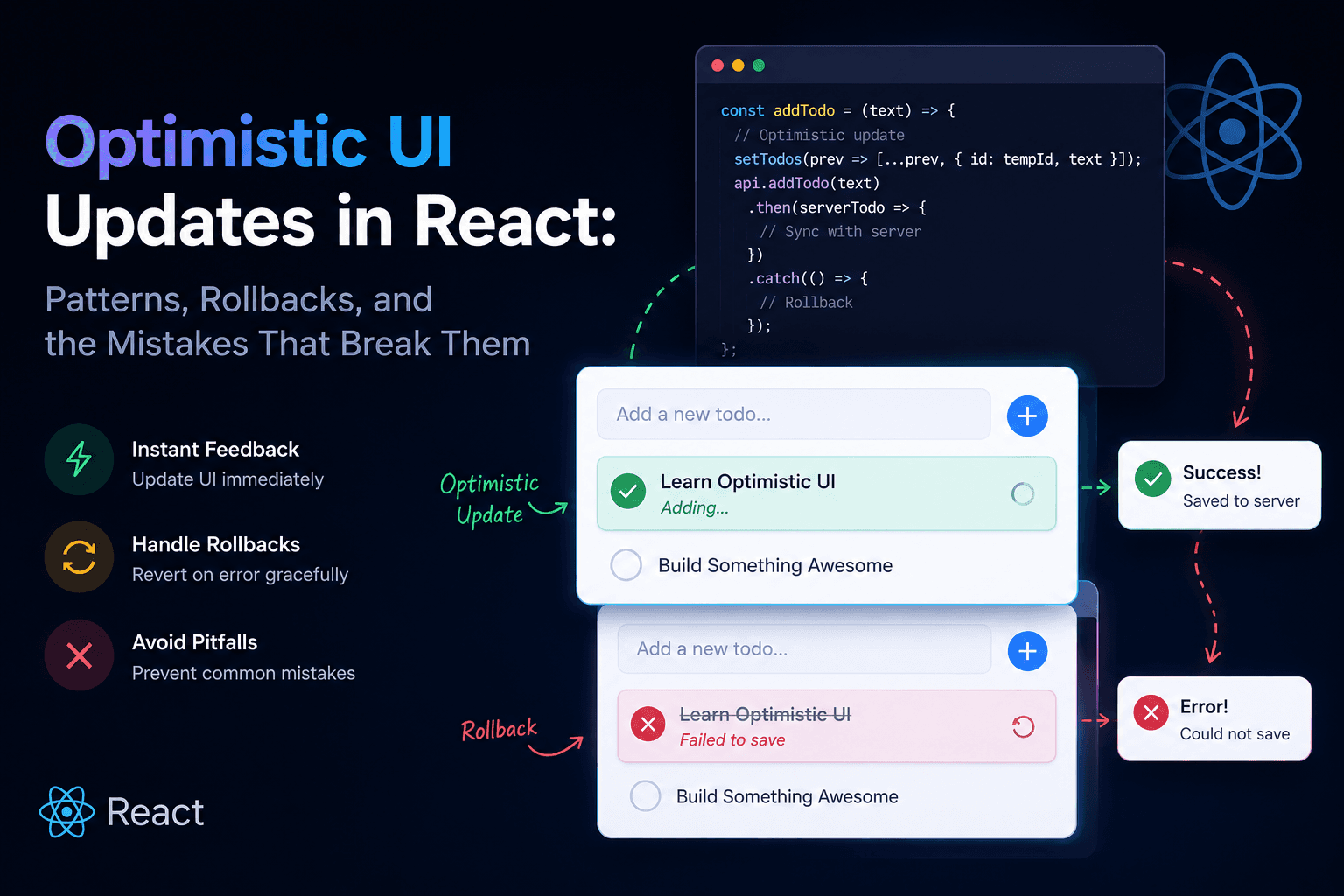
An optimistic update assumes the request will succeed and updates the UI before the server confirms it. The alternative — wait for the response, then update — is safer but feels slow for anything a user expects to be instant: likes, toggles, drag-and-drop reordering, adding an item to a cart, checking off a to-do.
The trade you're making is explicit: faster perceived UI in exchange for owning the rollback path when the request fails. If you're not willing to build the rollback, don't build the optimistic update — a slow-but-correct UI beats a fast-but-wrong one.
When it's worth it
Optimistic updates earn their complexity when:
- The action is low-risk and reversible (like, favorite, mark as read).
- The success rate is high — rollbacks should be the rare path, not the common one.
- The user has immediate visual expectation — a checkbox that doesn't check instantly reads as broken, even if it's technically "loading."
They're usually not worth it for:
- Payments or anything financial — the cost of showing a wrong "success" state outweighs the UX win.
- Multi-step or irreversible actions — deleting an account, submitting a form with side effects you can't cleanly undo.
- Low-confidence requests — if failures are common (flaky third-party integration, validation-heavy endpoint), the rollback becomes the primary experience, not the exception.
The core lifecycle
Every optimistic update, regardless of library, follows the same shape:
- Snapshot the current state before mutating.
- Apply the optimistic change immediately.
- Fire the request.
- On success — reconcile with the server response (don't just leave the optimistic guess in place if the server returns different data).
- On failure — roll back to the snapshot, and surface the failure.
Skipping step 1 is the most common mistake I see. Without a snapshot, "roll back" becomes "guess what the previous state was," which is how UI state drifts from server state over a session.
Manual implementation with useState
For a single, local piece of state, you don't need a library:
1function LikeButton({ postId, initialLiked, initialCount }: Props) {
2const [liked, setLiked] = useState(initialLiked);
3const [count, setCount] = useState(initialCount);
4
5async function toggleLike() {
6const snapshot = { liked, count };
7
8  // 1. Apply optimistically
9  const nextLiked = !liked;
10  setLiked(nextLiked);
11  setCount((c) => c + (nextLiked ? 1 : -1));
12
13  try {
14    // 2. Fire the request
15    const result = await api.toggleLike(postId);
16
17    // 3. Reconcile with the server's actual numbers, not our guess
18    setLiked(result.liked);
19    setCount(result.count);
20  } catch {
21    // 4. Roll back on failure
22    setLiked(snapshot.liked);
23    setCount(snapshot.count);
24    toast.error("Couldn't update like, please try again.");
25  }
26
27}
28
29return (
30
31<button onClick={toggleLike} aria-pressed={liked}>
32{liked ? "♥" : "♡"} {count}
33</button>
34);
35}
Notice the reconciliation step: on success, we set state to result.liked
and result.count from the server — not just leave our optimistic guess in
place. If another client liked the same post in the meantime, the server's
count is the truth, and our guess was only ever a placeholder.
The double-click race condition
Here's where the naive version breaks. If the user clicks twice before the first request resolves, you get two in-flight requests racing against a single snapshot and a single rollback path. Whichever response lands last wins — regardless of which click it actually belongs to.
The fix is to key the in-flight request and ignore stale responses:
1function LikeButton({ postId, initialLiked, initialCount }: Props) {
2const [liked, setLiked] = useState(initialLiked);
3const [count, setCount] = useState(initialCount);
4const requestIdRef = useRef(0);
5
6async function toggleLike() {
7const snapshot = { liked, count };
8const thisRequestId = ++requestIdRef.current;
9
10  const nextLiked = !liked;
11  setLiked(nextLiked);
12  setCount((c) => c + (nextLiked ? 1 : -1));
13
14  try {
15    const result = await api.toggleLike(postId);
16
17    // Ignore this response if a newer click has already superseded it
18    if (requestIdRef.current !== thisRequestId) return;
19
20    setLiked(result.liked);
21    setCount(result.count);
22  } catch {
23    if (requestIdRef.current !== thisRequestId) return;
24
25    setLiked(snapshot.liked);
26    setCount(snapshot.count);
27    toast.error("Couldn't update like, please try again.");
28  }
29
30}
31
32return (
33
34<button onClick={toggleLike} aria-pressed={liked}>
35{liked ? "♥" : "♡"} {count}
36</button>
37);
38}
This is the same class of problem as a server-side race condition — a stale read (or in this case, a stale response) landing after a newer one already changed the state. The fix is conceptually identical too: tag the operation and ignore anything that isn't current, rather than trusting arrival order.
Doing it with React Query / TanStack Query
For anything backed by cached server state, I'd rather not hand-roll snapshot
and rollback logic per component. useMutation's onMutate/onError/
onSettled lifecycle exists for exactly this:
1function useToggleLike(postId: string) {
2const queryClient = useQueryClient();
3const queryKey = ["post", postId];
4
5return useMutation({
6mutationFn: () => api.toggleLike(postId),
7
8  onMutate: async () => {
9    // Cancel in-flight refetches so they don't clobber our optimistic write
10    await queryClient.cancelQueries({ queryKey });
11
12    const previous = queryClient.getQueryData<Post>(queryKey);
13
14    queryClient.setQueryData<Post>(queryKey, (old) =>
15      old
16        ? {
17            ...old,
18            liked: !old.liked,
19            likeCount: old.likeCount + (old.liked ? -1 : 1),
20          }
21        : old,
22    );
23
24    // Passed to onError as context — this is the snapshot
25    return { previous };
26  },
27
28  onError: (_err, _vars, context) => {
29    if (context?.previous) {
30      queryClient.setQueryData(queryKey, context.previous);
31    }
32    toast.error("Couldn't update like, please try again.");
33  },
34
35  onSettled: () => {
36    // Reconcile with the server regardless of outcome
37    queryClient.invalidateQueries({ queryKey });
38  },
39
40});
41}
cancelQueries in onMutate matters more than it looks: without it, a
background refetch that was already in flight can resolve after your
optimistic write and silently overwrite it with stale data. onSettled
calling invalidateQueries closes the loop by refetching the real state once
the mutation is done — success or failure — so the optimistic guess never
outlives its usefulness.
Optimistic updates on lists
Single-object toggles are the easy case. Reordering or adding to a list adds a wrinkle: the optimistic item usually doesn't have a real ID yet.
1function useAddTodo() {
2const queryClient = useQueryClient();
3
4return useMutation({
5mutationFn: (title: string) => api.createTodo(title),
6
7  onMutate: async (title) => {
8    await queryClient.cancelQueries({ queryKey: ["todos"] });
9    const previous = queryClient.getQueryData<Todo[]>(["todos"]);
10
11    const optimisticTodo: Todo = {
12      id: `optimistic-${crypto.randomUUID()}`,
13      title,
14      done: false,
15      pending: true, // used to render a subtle loading state on this row
16    };
17
18    queryClient.setQueryData<Todo[]>(["todos"], (old = []) => [
19      ...old,
20      optimisticTodo,
21    ]);
22
23    return { previous, optimisticId: optimisticTodo.id };
24  },
25
26  onError: (_err, _vars, context) => {
27    if (context?.previous) {
28      queryClient.setQueryData(["todos"], context.previous);
29    }
30  },
31
32  onSuccess: (created, _vars, context) => {
33    // Swap the temporary optimistic row for the real server record
34    queryClient.setQueryData<Todo[]>(["todos"], (old = []) =>
35      old.map((todo) =>
36        todo.id === context?.optimisticId ? created : todo,
37      ),
38    );
39  },
40
41});
42}
The pending: true flag lets you render the row slightly differently (muted
text, a small spinner) while it's unconfirmed — which is often better UX than
pretending the optimistic item is fully real. The temporary optimistic-
prefixed ID also matters: it stops the optimistic row from colliding with a
real ID if the server later returns one that happens to match something
else in the cache.
Trade-offs
Optimistic vs pessimistic (wait-then-update)
Optimistic wins on perceived speed for cheap, high-success-rate actions. Pessimistic wins when correctness matters more than snappiness, or when the failure rate is high enough that rollbacks would be the common case rather than the exception.
Reconcile vs trust the optimistic guess
Some implementations skip reconciliation and just leave the optimistic state in place after success, assuming it matches. That's fine for a boolean toggle where the guess is always right. It's not fine for anything with derived or shared state — like counts, balances, positions in a list — where the server is the only source of truth that accounts for other clients.
Per-component rollback vs a shared mutation cache
Hand-rolled useState rollback is fine for one-off, purely local UI (a
disclosure toggle, a draft field). Once state is shared across components or
already lives in a query cache, React Query's mutation lifecycle is less code
than reimplementing snapshot/rollback per component, and it composes with
cache invalidation you likely already have.
Common mistakes
- No snapshot before the optimistic write. Without one, rollback becomes a guess instead of a restore.
- Ignoring response order on rapid repeated actions. The double-click race condition above — treat this the same way you'd treat a backend race condition, because it is one.
- Trusting the optimistic guess instead of reconciling. Fine for a boolean; wrong for anything derived from server-side state shared across users.
- Forgetting to cancel in-flight queries before an optimistic write in React Query — a stale background refetch can silently overwrite your optimistic state.
- No visual distinction for unconfirmed state. A user should be able to tell, even subtly, that a new list item hasn't been confirmed by the server yet — especially if failures aren't rare.
- Applying optimistic updates to irreversible or high-stakes actions, where a UI that briefly lies about success is worse than a UI that waits.
Practical recommendations
- Reserve optimistic updates for actions that are cheap, reversible, and usually succeed.
- Always snapshot before mutating, and always define the rollback before shipping the optimistic path.
- Reconcile with the server response on success — don't assume your optimistic guess was exactly right.
- Guard against out-of-order responses on anything a user can trigger repeatedly in quick succession.
- If you're on React Query, use
onMutate/onError/onSettledrather than hand-rolling the same lifecycle per component. - Give unconfirmed optimistic items a visual signal, however subtle, so a failure doesn't feel like the UI lied.
Conclusion
Optimistic UI is a genuine UX win, but it's a contract: the UI is allowed to lie briefly about the outcome only if you've built a correct way to take the lie back. Snapshot, apply, reconcile, roll back — the lifecycle doesn't change whether you write it by hand or lean on a library's mutation cache. Most of the bugs I've seen in this pattern come from skipping one of those four steps, not from getting the UI itself wrong.
The same discipline that keeps a backend correct under concurrent writes — don't trust arrival order, always have a source of truth to reconcile against — applies just as directly on the client. Optimistic UI just moves the question of "what happens between the read and the write" from the server into the browser.