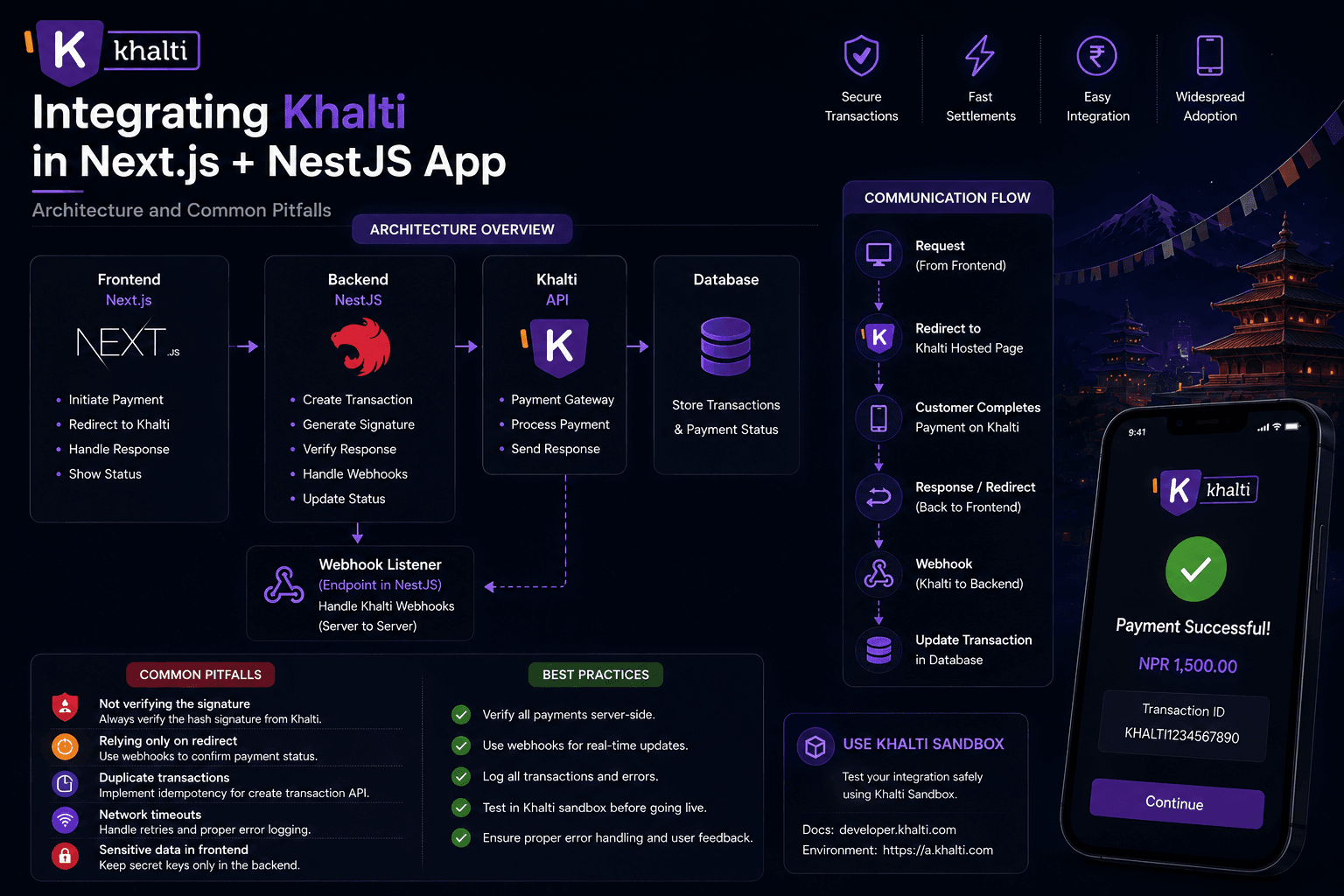
Khalti Web Checkout (KPG-2) is the usual path for accepting wallet,
banking, and related payments in a Nepali web app. The flow is
server-initiated: your backend asks Khalti for a pidx and payment_url,
the user pays on Khalti's page, then you must confirm with the lookup API
before treating the order as paid.
This guide covers a full integration with Next.js and NestJS, aligned with Khalti's official docs:
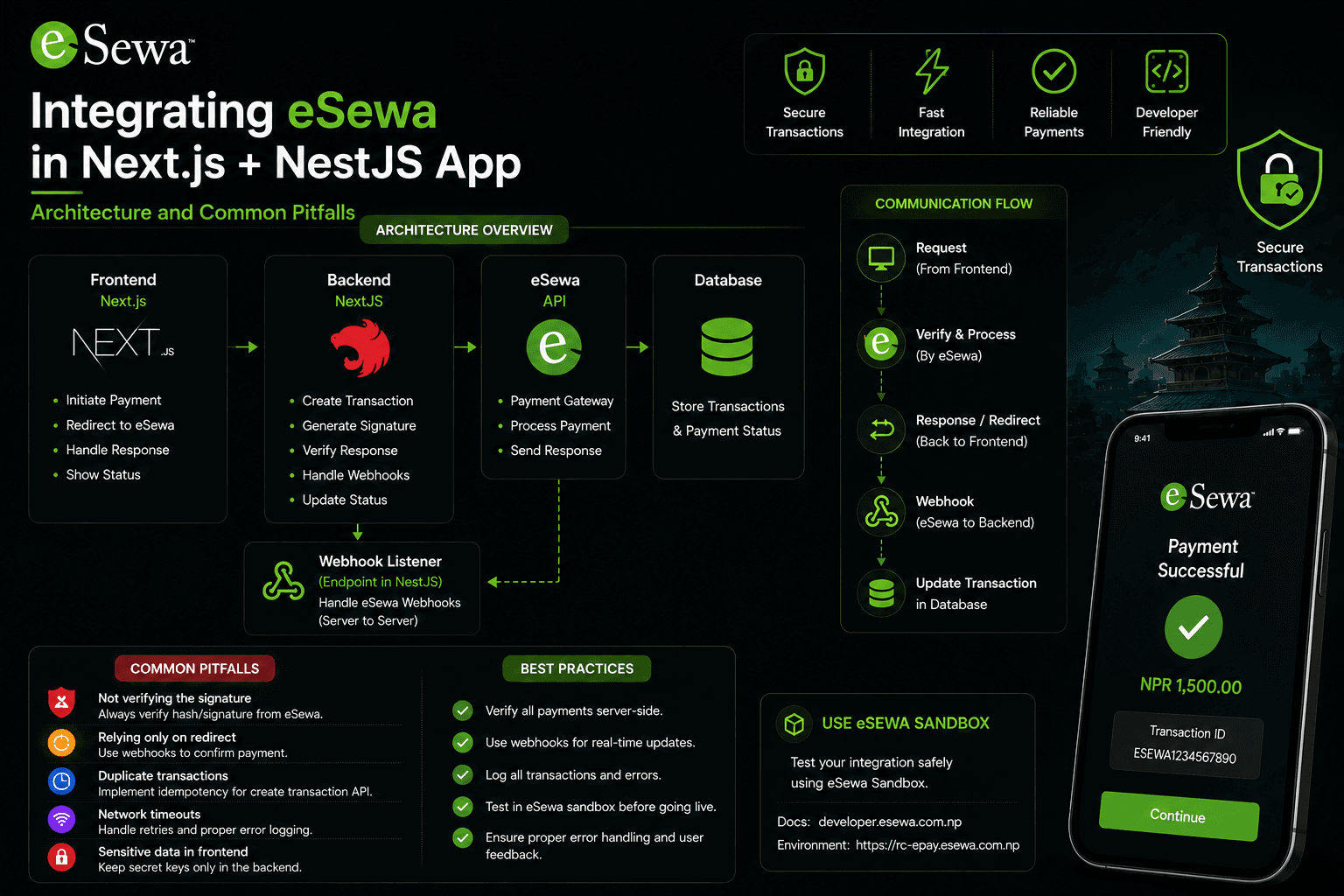
If you need eSewa instead, see Integrating eSewa ePay v2 in Next.js + NestJS.
Official docs and endpoints
Base URLs
- Sandbox:
https://dev.khalti.com/api/v2/ - Production:
https://khalti.com/api/v2/
Endpoints (relative to the base)
- Initiate:
POST /epayment/initiate/ - Lookup / verify:
POST /epayment/lookup/
Merchant dashboards
- Sandbox signup / keys: test-admin.khalti.com (sign up via the sandbox merchant flow in Getting started)
- Production: admin.khalti.com
Authorization header on every server call:
Authorization: Key <live_secret_key>
Use the live secret key from the sandbox admin while testing, and the live
secret key from the production admin when you go live. Never expose it as
NEXT_PUBLIC_*.
What the flow actually is
From Khalti's getting started and Web Checkout docs:
- Your merchant backend creates a unique
purchase_order_id. - Backend
POSTs to/epayment/initiate/with amount (in paisa),return_url,website_url, and order details. - Khalti returns
pidx,payment_url, and expiry metadata. - You redirect the user to
payment_url. - After payment (or cancel), Khalti redirects to
return_urlwith query params (pidx,status,amount, …). - Your backend calls
/epayment/lookup/with thatpidx. - Only lookup status
Completedmeans you may fulfill the order.
Khalti is explicit: incomplete lookup integration, or fulfilling without checking lookup status, is on you — they will not cover losses from that.
Step 1 — Sign up as a merchant
- Create a sandbox merchant account (link from Getting started → Test Environment).
- Copy the live secret key from the sandbox merchant dashboard for server calls.
- For production later, create a live merchant account and replace the base URL + secret key.
Sandbox test users (from the docs):
- Khalti IDs:
9800000000…9800000005 - MPIN:
1111 - OTP:
987654 - Login OTP for sandbox merchant flows:
987654
Note: eBanking and card payments are not available in the test environment. Wallet test IDs are what you use in UAT.
Step 2 — Configure environment variables
KHALTI_SECRET_KEY=live_secret_key_from_dashboard
KHALTI_BASE_URL=https://dev.khalti.com/api/v2
APP_URL=https://your-app.example
WEBSITE_URL=https://your-app.example
Production later:
KHALTI_BASE_URL=https://khalti.com/api/v2
Step 3 — Know the initiate payload
Required fields (Web Checkout docs):
return_url— landing page after the transaction (must support GET)website_url— your site URLamount— total payable in paisa (Rs 1 = 100 paisa). Minimum is Rs 10 (1000 paisa)purchase_order_id— unique id from your systempurchase_order_name— product / order name
Optional but useful:
customer_info—{ name, email, phone }amount_breakdown— labels that must sum exactly toamountproduct_details— line items- Any extra fields prefixed with
merchant_(returned on success callback)
Step 4 — Initiate payment from NestJS
Every initiate call is a server-side POST. Persist a PENDING order with
the same purchase_order_id and expected amount (in paisa or rupees —
pick one unit and stay consistent) before calling Khalti.
1import { Injectable } from "@nestjs/common";
2import { ConfigService } from "@nestjs/config";
3import { HttpService } from "@nestjs/axios";
4import { firstValueFrom } from "rxjs";
5
6interface InitiateInput {
7purchaseOrderId: string;
8purchaseOrderName: string;
9amountInRupees: number;
10customer?: { name: string; email: string; phone: string };
11}
12
13interface InitiateResponse {
14pidx: string;
15payment_url: string;
16expires_at: string;
17expires_in: number;
18}
19
20@Injectable()
21export class KhaltiService {
22private readonly secretKey: string;
23private readonly baseUrl: string;
24
25constructor(
26private readonly config: ConfigService,
27private readonly http: HttpService,
28) {
29this.secretKey = this.config.getOrThrow("KHALTI_SECRET_KEY");
30this.baseUrl = this.config.getOrThrow("KHALTI_BASE_URL");
31}
32
33async initiate(input: InitiateInput): Promise<InitiateResponse> {
34const amountPaisa = Math.round(input.amountInRupees * 100);
35
36  if (amountPaisa < 1000) {
37    throw new Error("Khalti minimum amount is Rs 10 (1000 paisa)");
38  }
39
40  const { data } = await firstValueFrom(
41    this.http.post<InitiateResponse>(
42      `${this.baseUrl}/epayment/initiate/`,
43      {
44        return_url: `${this.config.getOrThrow("APP_URL")}/api/payments/khalti/verify`,
45        website_url: this.config.getOrThrow("WEBSITE_URL"),
46        amount: amountPaisa,
47        purchase_order_id: input.purchaseOrderId,
48        purchase_order_name: input.purchaseOrderName,
49        customer_info: input.customer,
50      },
51      {
52        headers: {
53          Authorization: `Key ${this.secretKey}`,
54          "Content-Type": "application/json",
55        },
56      },
57    ),
58  );
59
60  return data;
61
62}
63
64async lookup(pidx: string) {
65const { data } = await firstValueFrom(
66this.http.post(
67`${this.baseUrl}/epayment/lookup/`,
68{ pidx },
69{
70headers: {
71Authorization: `Key ${this.secretKey}`,
72"Content-Type": "application/json",
73},
74},
75),
76);
77
78  return data as {
79    pidx: string;
80    total_amount: number;
81    status: string;
82    transaction_id: string | null;
83    fee: number;
84    refunded: boolean;
85  };
86
87}
88}
Controller:
1@Post("khalti/initiate")
2async initiateKhalti(
3@Body()
4body: {
5  orderId: string;
6  amountInRupees: number;
7  orderName: string;
8},
9) {
10await this.ordersService.createPending(body.orderId, body.amountInRupees);
11
12const session = await this.khaltiService.initiate({
13purchaseOrderId: body.orderId,
14purchaseOrderName: body.orderName,
15amountInRupees: body.amountInRupees,
16});
17
18// Persist pidx so reconciliation can look up without the browser callback
19await this.ordersService.attachPidx(body.orderId, session.pidx);
20
21return { paymentUrl: session.payment_url, pidx: session.pidx };
22}
Successful initiate response shape:
{
  "pidx": "bZQLD9wRVWo4CdESSfuSsB",
  "payment_url": "https://test-pay.khalti.com/?pidx=bZQLD9wRVWo4CdESSfuSsB",
  "expires_at": "2023-05-25T16:26:16.471649+05:45",
  "expires_in": 1800
}
Redirect the browser to payment_url immediately. Do not invent your own
checkout UI for the wallet step.
Step 5 — Redirect from Next.js
1"use client";
2
3import { useState } from "react";
4
5export function PayWithKhaltiButton({
6orderId,
7amountInRupees,
8orderName,
9}: {
10orderId: string;
11amountInRupees: number;
12orderName: string;
13}) {
14const [loading, setLoading] = useState(false);
15
16async function handlePay() {
17setLoading(true);
18try {
19const res = await fetch("/api/payments/khalti/initiate", {
20method: "POST",
21headers: { "Content-Type": "application/json" },
22body: JSON.stringify({ orderId, amountInRupees, orderName }),
23});
24const { paymentUrl } = (await res.json()) as { paymentUrl: string };
25window.location.assign(paymentUrl);
26} catch {
27setLoading(false);
28}
29}
30
31return (
32
33<button disabled={loading} onClick={handlePay} type="button">
34{loading ? "Redirecting…" : "Pay with Khalti"}
35</button>
36);
37}
Step 6 — Handle the return_url callback
return_url must accept GET. Khalti appends query parameters.
Success example (from the docs):
https://example.com/payment/
  ?pidx=...
  &status=Completed
  &transaction_id=...
  &amount=1000
  &total_amount=1000
  &purchase_order_id=test12
  &purchase_order_name=test
  &mobile=98XXXXX904
  &tidx=...
Canceled example:
...?pidx=...
  &status=User canceled
  &amount=1000
  &total_amount=1000
  &purchase_order_id=test12
  &purchase_order_name=test
Callback status values you will see include Completed, Pending, and
User canceled. Treat the callback as a hint. Khalti recommends always
confirming with lookup after redirect.
Payment links expire (docs: about 60 minutes in production by default).
Sandbox initiate responses also include expires_in (often 1800 seconds).
Step 7 — Lookup verification (the step that isn't optional)
POST /epayment/lookup/ with body { "pidx": "..." } and the same
Authorization: Key … header.
Lookup status meanings (summarized from the docs):
Completed— success; you may provide the servicePending— hold; do not fulfill; contact Khalti if it sticksRefunded/Partially Refunded— do not fulfillExpired— user did not pay; do not fulfillUser canceled— do not fulfillInitiated— not finished; do not fulfill
Only Completed is success.
1@Get("khalti/verify")
2async verifyKhalti(
3@Query("pidx") pidx: string,
4@Query("purchase_order_id") purchaseOrderId: string,
5@Res() res: Response,
6) {
7if (!pidx) {
8  return res.redirect("/payment/failed");
9}
10
11const lookup = await this.khaltiService.lookup(pidx);
12
13if (lookup.status !== "Completed") {
14return res.redirect("/payment/failed");
15}
16
17const expectedPaisa = await this.ordersService.getPendingAmountPaisa(
18purchaseOrderId ?? lookup.pidx,
19);
20
21if (lookup.total_amount !== expectedPaisa) {
22return res.redirect("/payment/failed");
23}
24
25await this.ordersService.markPaidIfPending(
26purchaseOrderId,
27expectedPaisa / 100,
28lookup.transaction_id,
29);
30
31return res.redirect(`/payment/success?orderId=${purchaseOrderId}`);
32}
Compare amounts in the same unit Khalti uses on lookup (total_amount is
in paisa).
Step 8 — Idempotent order updates
Users refresh, networks retry, and you may also run a reconciliation job on
stored pidx values. Guard side effects:
1async markPaidIfPending(
2purchaseOrderId: string,
3amountInRupees: number,
4khaltiTransactionId: string | null,
5) {
6const result = await this.prisma.order.updateMany({
7  where: {
8    id: purchaseOrderId,
9    status: "PENDING",
10    totalAmount: amountInRupees,
11  },
12  data: {
13    status: "PAID",
14    paidAt: new Date(),
15    gatewayRef: khaltiTransactionId,
16  },
17});
18
19if (result.count === 0) {
20return;
21}
22
23await this.notifications.sendPaymentConfirmation(purchaseOrderId);
24}
Step 9 — Success page reads DB status, not the URL
1import { redirect } from "next/navigation";
2
3export default async function PaymentSuccessPage({
4searchParams,
5}: {
6searchParams: Promise<{ orderId?: string }>;
7}) {
8const { orderId } = await searchParams;
9if (!orderId) redirect("/");
10
11const order = await getOrder(orderId);
12
13if (order.status !== "PAID") {
14redirect("/payment/pending");
15}
16
17return <OrderConfirmation order={order} />;
18}
If lookup is slow or the user bookmarks a crafted URL, the page still stays
honest because it only celebrates a PAID row.
Step 10 — Reconciliation for missed redirects
Store pidx at initiate time. Periodically:
- Find orders still
PENDINGwith a non-nullpidxand not expired. - Call lookup.
- If
Completedand amount matches, run the samemarkPaidIfPending. - If
ExpiredorUser canceled, mark the order failed / canceled.
That covers closed tabs and mobile browsers that never hit return_url.
Step 11 — Go live
From Going Live:
- Create a live merchant account.
- Replace sandbox base URL with
https://khalti.com/api/v2. - Replace the secret key with the production live secret key.
- Retest initiate → pay → callback → lookup.
- Complete KYC / contact Khalti to lift the default NPR 200 per transaction limit that applies until they remove it (phone numbers are listed on the getting-started page).
Initiate validation errors to handle
Khalti returns field errors for things like:
- blank / invalid
return_urlorwebsite_url - amount below 1000 paisa
- non-integer amount
- blank
purchase_order_id/purchase_order_name amount_breakdownthat does not sum toamount- invalid / missing
Authorization(Invalid token.,Authentication credentials were not provided.)
Surface these to your checkout UI instead of sending the user to a broken payment page.
Common mistakes
- Marking paid from
status=Completedon the return URL alone. - Skipping lookup, or treating
Pendingas success. - Sending amount in rupees instead of paisa on initiate.
- Putting the secret key in
NEXT_PUBLIC_*. - Non-idempotent success handlers.
- Not storing
pidx, so missed redirects can never be reconciled. - Fulfilling on cancel / expired / refunded lookup statuses.
- Forgetting the NPR 200 live limit until KYC is cleared.
Practical checklist
- Sandbox merchant + live secret key configured
- Pending order +
pidxpersisted before redirect - Initiate uses paisa and minimum Rs 10
- User redirected to
payment_url -
return_urlaccepts GET query params - Lookup called on every callback
- Only
Completedmarks the order paid - Amount checked against your order
- Idempotent
markPaidIfPending - Success page reads DB status
- Reconciliation job for stored
pidx - Production URL, live key, and KYC limit handled
Conclusion
Khalti Web Checkout is straightforward if you follow the documented contract:
initiate on the server, redirect to payment_url, then lookup before
fulfillment. The callback query string is convenience for UX, not proof of
payment.
Official references: