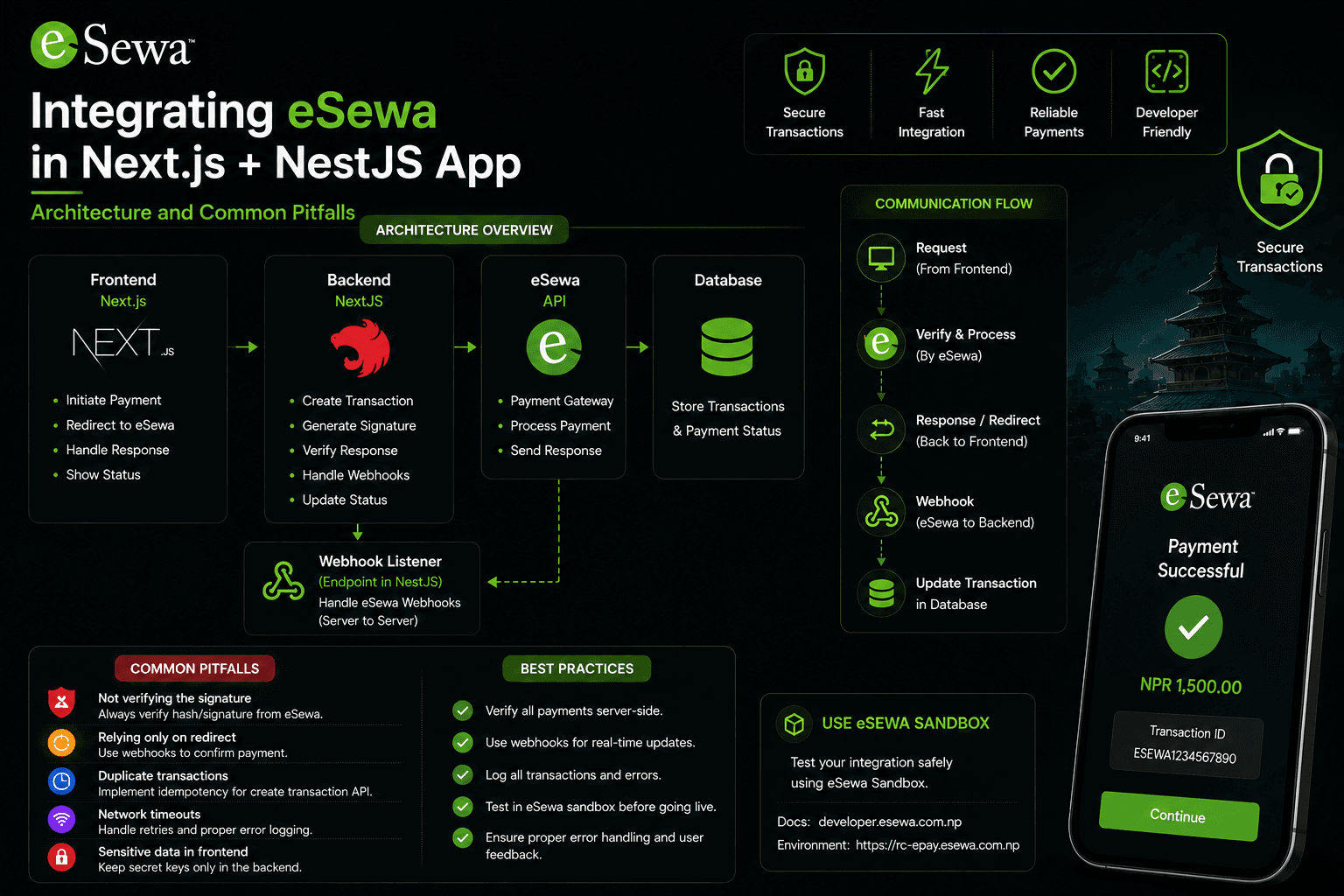
If you ship products for the Nepali market, eSewa is usually not a nice-to-have — it is how people expect to pay. The integration looks simple on the surface: build a signed form, redirect the user, wait for them to come back. The part that goes wrong in production is trusting that return URL.
This guide walks through a full eSewa ePay v2 integration with a Next.js frontend and a NestJS API, aligned with the official eSewa ePay documentation. Every step below is one you need before you can safely mark an order as paid.
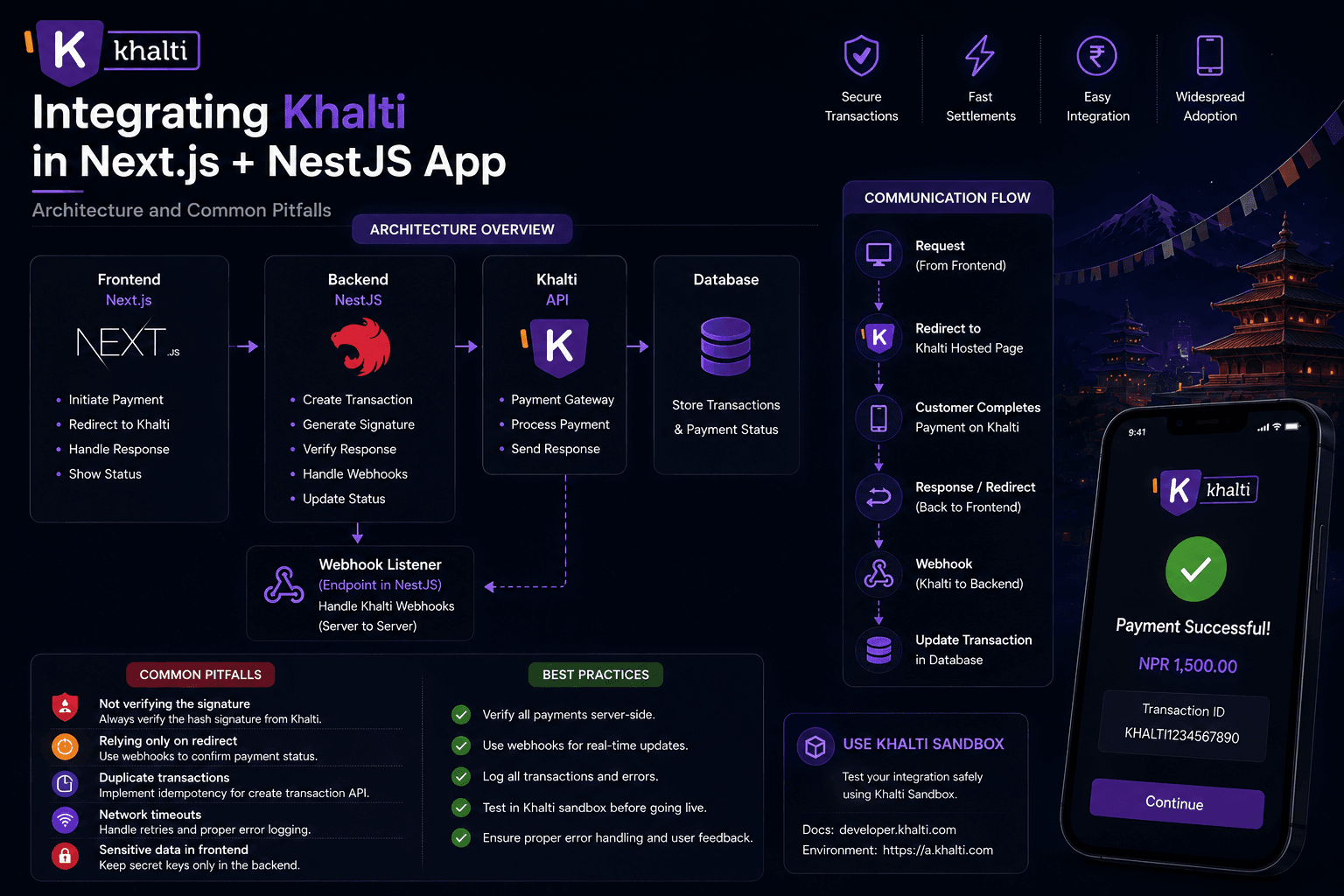
If you need Khalti instead, see Integrating Khalti Web Checkout in Next.js + NestJS.
Official docs and endpoints
Bookmark these first:
- eSewa ePay overview and integration
- ePay v2 page
- Merchant dashboard (production): merchant.esewa.com.np
Payment form (POST)
- Development:
https://rc-epay.esewa.com.np/api/epay/main/v2/form - Production:
https://epay.esewa.com.np/api/epay/main/v2/form
Transaction status check (GET)
- Development:
https://rc.esewa.com.np/api/epay/transaction/status/ - Production:
https://esewa.com.np/api/epay/transaction/status/
What the flow actually is
From eSewa's own transaction flow:
- The user chooses eSewa on your checkout page.
- Your backend builds a signed payload and the browser POSTs it to eSewa's payment form URL.
- The user logs in on eSewa, confirms the amount, and completes payment (OTP / token step included).
- On success, eSewa redirects to your
success_urlwith a base64-encodeddataquery parameter. On failure or pending, it redirects tofailure_url. - Your backend decodes that payload, verifies the response signature, then calls the status check API.
- Only after the status API returns
COMPLETE— and the amount matches your order — do you mark the order paid.
eSewa also notes that if a response is not received within about five minutes, you should use the status check API to confirm the payment. That same API is what you should use on every success callback for fraud filtering.
Step 1 — Get merchant credentials
For Development (from the official credentials section):
- Merchant / product code:
EPAYTEST - Secret key:
8gBm/:&EnhH.1/q - Test eSewa IDs:
9711111111,9711111112,9711111113,9711111114(confirm against the current credentials section — eSewa occasionally updates UAT numbers) - Password:
Nepal@123 - MPIN (app):
1122 - Token (testing):
123456
For production, eSewa issues your real product_code and SecretKey. Never
put the secret in a NEXT_PUBLIC_* variable.
Store server-only env vars:
ESEWA_PRODUCT_CODE=EPAYTEST
ESEWA_SECRET_KEY=8gBm/:&EnhH.1/q
ESEWA_PAYMENT_URL=https://rc-epay.esewa.com.np/api/epay/main/v2/form
ESEWA_STATUS_URL=https://rc.esewa.com.np/api/epay/transaction/status/
APP_URL=https://your-app.example
Swap the URLs and keys when you go live.
Step 2 — Understand every request field
All of these are required by eSewa. If tax / service / delivery charges do not
apply, send 0 — do not omit them.
amount— product amounttax_amount— tax on the productproduct_service_charge— merchant service chargeproduct_delivery_charge— delivery chargetotal_amount— must equalamount + tax_amount + product_service_charge + product_delivery_chargetransaction_uuid— unique per request; alphanumeric and hyphen (-) onlyproduct_code— merchant code from eSewasuccess_url— where eSewa redirects after a successful paymentfailure_url— where eSewa redirects after failure or pendingsigned_field_names— fields used to build the signature (typicallytotal_amount,transaction_uuid,product_code)signature— HMAC-SHA256 of those fields, Base64-encoded
Step 3 — Generate the HMAC-SHA256 signature (server-side)
Per the docs, the message must use the signed fields in order:
total_amount=100,transaction_uuid=11-201-13,product_code=EPAYTEST
Algorithm: HMAC-SHA256 with your merchant secret. Output: Base64.
1import { createHmac } from "node:crypto";
2import { Injectable } from "@nestjs/common";
3import { ConfigService } from "@nestjs/config";
4
5export interface EsewaFormPayload {
6amount: string;
7tax_amount: string;
8total_amount: string;
9transaction_uuid: string;
10product_code: string;
11product_service_charge: string;
12product_delivery_charge: string;
13success_url: string;
14failure_url: string;
15signed_field_names: string;
16signature: string;
17}
18
19@Injectable()
20export class EsewaService {
21private readonly secretKey: string;
22private readonly productCode: string;
23readonly paymentUrl: string;
24readonly statusUrl: string;
25
26constructor(private readonly config: ConfigService) {
27this.secretKey = this.config.getOrThrow("ESEWA_SECRET_KEY");
28this.productCode = this.config.getOrThrow("ESEWA_PRODUCT_CODE");
29this.paymentUrl = this.config.getOrThrow("ESEWA_PAYMENT_URL");
30this.statusUrl = this.config.getOrThrow("ESEWA_STATUS_URL");
31}
32
33buildFormPayload(orderId: string, amount: number): EsewaFormPayload {
34const amountStr = amount.toFixed(2);
35const payload = {
36amount: amountStr,
37tax_amount: "0",
38total_amount: amountStr,
39transaction_uuid: orderId,
40product_code: this.productCode,
41product_service_charge: "0",
42product_delivery_charge: "0",
43success_url: `${this.config.getOrThrow("APP_URL")}/api/payments/esewa/verify`,
44failure_url: `${this.config.getOrThrow("APP_URL")}/payment/failed`,
45signed_field_names: "total_amount,transaction_uuid,product_code",
46};
47
48  return {
49    ...payload,
50    signature: this.sign(
51      `total_amount=${payload.total_amount},transaction_uuid=${payload.transaction_uuid},product_code=${payload.product_code}`,
52    ),
53  };
54
55}
56
57/**
58
59- Verifies the signature eSewa returns on the success redirect.
60- signed_field_names in the response lists the fields to hash, in order.
61*/
62verifyResponseSignature(decoded: Record<string, string>): boolean {
63const fieldNames = decoded.signed_field_names?.split(",") ?? [];
64const message = fieldNames
65.map((name) => `${name}=${decoded[name]}`)
66.join(",");
67const expected = this.sign(message);
68return expected === decoded.signature;
69}
70
71private sign(message: string): string {
72return createHmac("sha256", this.secretKey).update(message).digest("base64");
73}
74}
Do this only on the server. If the secret ever reaches the browser bundle, anyone can forge initiation payloads.
Step 4 — Create a pending order, then return the form fields
Before redirecting, persist an order in PENDING with the same
transaction_uuid and expected total_amount. That record is your source of
truth for amount checks later.
1@Post("esewa/initiate")
2async initiateEsewa(@Body() body: { orderId: string; amount: number }) {
3await this.ordersService.createPending(body.orderId, body.amount);
4
5const form = this.esewaService.buildFormPayload(body.orderId, body.amount);
6
7return {
8paymentUrl: this.esewaService.paymentUrl,
9form,
10};
11}
Step 5 — Auto-submit the form from Next.js
eSewa expects a browser form POST, not a JSON API call from your frontend to their payment URL.
1"use client";
2
3import { useState } from "react";
4
5type EsewaForm = Record<string, string>;
6
7export function PayWithEsewaButton({
8orderId,
9amount,
10}: {
11orderId: string;
12amount: number;
13}) {
14const [loading, setLoading] = useState(false);
15
16async function handlePay() {
17setLoading(true);
18try {
19const res = await fetch("/api/payments/esewa/initiate", {
20method: "POST",
21headers: { "Content-Type": "application/json" },
22body: JSON.stringify({ orderId, amount }),
23});
24const { paymentUrl, form } = (await res.json()) as {
25paymentUrl: string;
26form: EsewaForm;
27};
28
29    const el = document.createElement("form");
30    el.method = "POST";
31    el.action = paymentUrl;
32
33    for (const [name, value] of Object.entries(form)) {
34      const input = document.createElement("input");
35      input.type = "hidden";
36      input.name = name;
37      input.value = value;
38      el.appendChild(input);
39    }
40
41    document.body.appendChild(el);
42    el.submit();
43  } catch {
44    setLoading(false);
45  }
46
47}
48
49return (
50
51<button disabled={loading} onClick={handlePay} type="button">
52{loading ? "Redirecting…" : "Pay with eSewa"}
53</button>
54);
55}
After submit, the user is on eSewa's login page. They authenticate, confirm the amount, enter the OTP / token, and finish payment.
Step 6 — Handle the success redirect
On success, eSewa redirects to your success_url with a Base64 data query
param. Decoded, it looks like:
{
  "transaction_code": "000AWEO",
  "status": "COMPLETE",
  "total_amount": "1000.0",
  "transaction_uuid": "250610-162413",
  "product_code": "EPAYTEST",
  "signed_field_names": "transaction_code,status,total_amount,transaction_uuid,product_code,signed_field_names",
  "signature": "62GcfZTmVkzhtUeh+QJ1AqiJrjoWWGof3U+eTPTZ7fA="
}
That payload is what the browser is claiming. You still must:
- Verify the response
signaturethe same way you signed the request. - Call the status check API.
- Compare amounts to your pending order.
Step 7 — Status check API (non-negotiable)
Query params: product_code, total_amount, transaction_uuid.
Possible statuses from the docs include PENDING, COMPLETE, FULL_REFUND,
PARTIAL_REFUND, AMBIGUOUS, NOT_FOUND, and CANCELED. Treat only
COMPLETE as paid.
1@Get("esewa/verify")
2async verifyEsewa(@Query("data") data: string, @Res() res: Response) {
3if (!data) {
4  return res.redirect("/payment/failed");
5}
6
7const decoded = JSON.parse(
8Buffer.from(data, "base64").toString("utf8"),
9) as Record<string, string>;
10
11if (!this.esewaService.verifyResponseSignature(decoded)) {
12return res.redirect("/payment/failed");
13}
14
15const statusRes = await this.httpService.axiosRef.get(
16this.esewaService.statusUrl,
17{
18params: {
19product_code: decoded.product_code,
20total_amount: decoded.total_amount,
21transaction_uuid: decoded.transaction_uuid,
22},
23},
24);
25
26if (statusRes.data.status !== "COMPLETE") {
27return res.redirect("/payment/failed");
28}
29
30const expected = await this.ordersService.getPendingAmount(
31decoded.transaction_uuid,
32);
33if (Number(decoded.total_amount) !== expected) {
34return res.redirect("/payment/failed");
35}
36
37await this.ordersService.markPaidIfPending(
38decoded.transaction_uuid,
39Number(decoded.total_amount),
40);
41
42return res.redirect(
43`/payment/success?orderId=${decoded.transaction_uuid}`,
44);
45}
If the user never returns (closed tab, killed mobile browser), run the same
status check from a reconciliation job using the stored transaction_uuid and
amount — that is exactly what eSewa documents for the five-minute no-response
case.
Step 8 — Idempotent order updates
Callbacks can fire more than once. Guard on PENDING so side effects run once:
1async markPaidIfPending(transactionUuid: string, amount: number) {
2const result = await this.prisma.order.updateMany({
3  where: {
4    transactionUuid,
5    status: "PENDING",
6    totalAmount: amount,
7  },
8  data: { status: "PAID", paidAt: new Date() },
9});
10
11if (result.count === 0) {
12return;
13}
14
15await this.notifications.sendPaymentConfirmation(transactionUuid);
16}
Step 9 — Success page reads DB status, not the URL
1import { redirect } from "next/navigation";
2
3export default async function PaymentSuccessPage({
4searchParams,
5}: {
6searchParams: Promise<{ orderId?: string }>;
7}) {
8const { orderId } = await searchParams;
9if (!orderId) redirect("/");
10
11const order = await getOrder(orderId);
12
13if (order.status !== "PAID") {
14redirect("/payment/pending");
15}
16
17return <OrderConfirmation order={order} />;
18}
Reaching /payment/success only means a browser hit that route. Confirmation
UI must follow the order row your NestJS verification already updated.
Step 10 — Go to production
When eSewa gives you live credentials:
- Replace
ESEWA_PRODUCT_CODEandESEWA_SECRET_KEY. - Point
ESEWA_PAYMENT_URLtohttps://epay.esewa.com.np/api/epay/main/v2/form. - Point
ESEWA_STATUS_URLtohttps://esewa.com.np/api/epay/transaction/status/. - Use HTTPS
success_url/failure_urlthat eSewa can reach. - Re-test happy path, cancel, expired session, and duplicate callback.
Monitor payments in merchant.esewa.com.np.
Common mistakes
- Marking paid from the redirect
dataalone — skip signature + status API and anyone can fake success by crafting a URL. - Checking only
decoded.status === "COMPLETE"without the status API. - Not verifying the response signature eSewa sends back.
- Not comparing
total_amountto your pending order amount. - Non-idempotent handlers that email / decrement stock twice.
- Putting
ESEWA_SECRET_KEYinNEXT_PUBLIC_*. - Invalid
transaction_uuidcharacters (only alphanumeric and-). total_amountthat does not equal amount + tax + service + delivery.- No reconciliation when the redirect never arrives.
Practical checklist
- UAT credentials and env URLs configured
- Pending order created before redirect
- HMAC signature generated server-side in field order
- Browser form POST to the ePay v2 form URL
- Success handler decodes Base64
data - Response signature verified
- Status API returns
COMPLETE - Amount matches your order
-
markPaidIfPendingis idempotent - Success page reads DB status
- Reconciliation job for missed redirects
- Production URLs and live keys swapped
Conclusion
eSewa ePay v2 is a classic redirect gateway: initiate with a signed form, receive a callback, then prove the payment with eSewa's status API before you fulfill anything. The official docs are clear that merchants must verify transactions to filter fraud — that step is not optional polish.
Get signature generation, status verification, and idempotent updates right once, and support stops becoming a manual ledger of "did this person actually pay?"
Official reference: developer.esewa.com.np/pages/Epay.