The first Dockerfile I write for a Vite-based app is almost always wrong in
one specific way: I set VITE_API_URL as a runtime environment variable on
the container, the way I would for any Node backend, and then wonder why the
deployed app is still calling the API URL from whichever .env was present
at build time. Vite doesn't work that way — and that one misunderstanding
shapes most of what a correct Dockerfile for a TanStack Start app has to do
differently from a typical Node service.
This article walks through a production Dockerfile for a TanStack Start app
— the multi-stage structure, why the Vite env vars are ARGs and not just
ENV, and the mistakes that either bloat the image or bake the wrong config
into the build.
Why this needs more thought than a generic Node Dockerfile
TanStack Start apps have two things going on that a plain Express or NestJS service doesn't:
- A client bundle built by Vite, where environment variables prefixed
VITE_are inlined into the JavaScript at build time — not read at runtime. Once the bundle is built,import.meta.env.VITE_API_URLis a literal string baked into a.jsfile, not a lookup against the container's environment. - A server output produced by Nitro (
.output/server/index.mjs), which is a normal Node process and does read runtime environment variables normally, for anything not prefixedVITE_.
Treating both halves the same way is the single most common mistake in these
Dockerfiles — passing VITE_API_URL as a runtime docker run -e variable
and expecting the already-built client to pick it up.
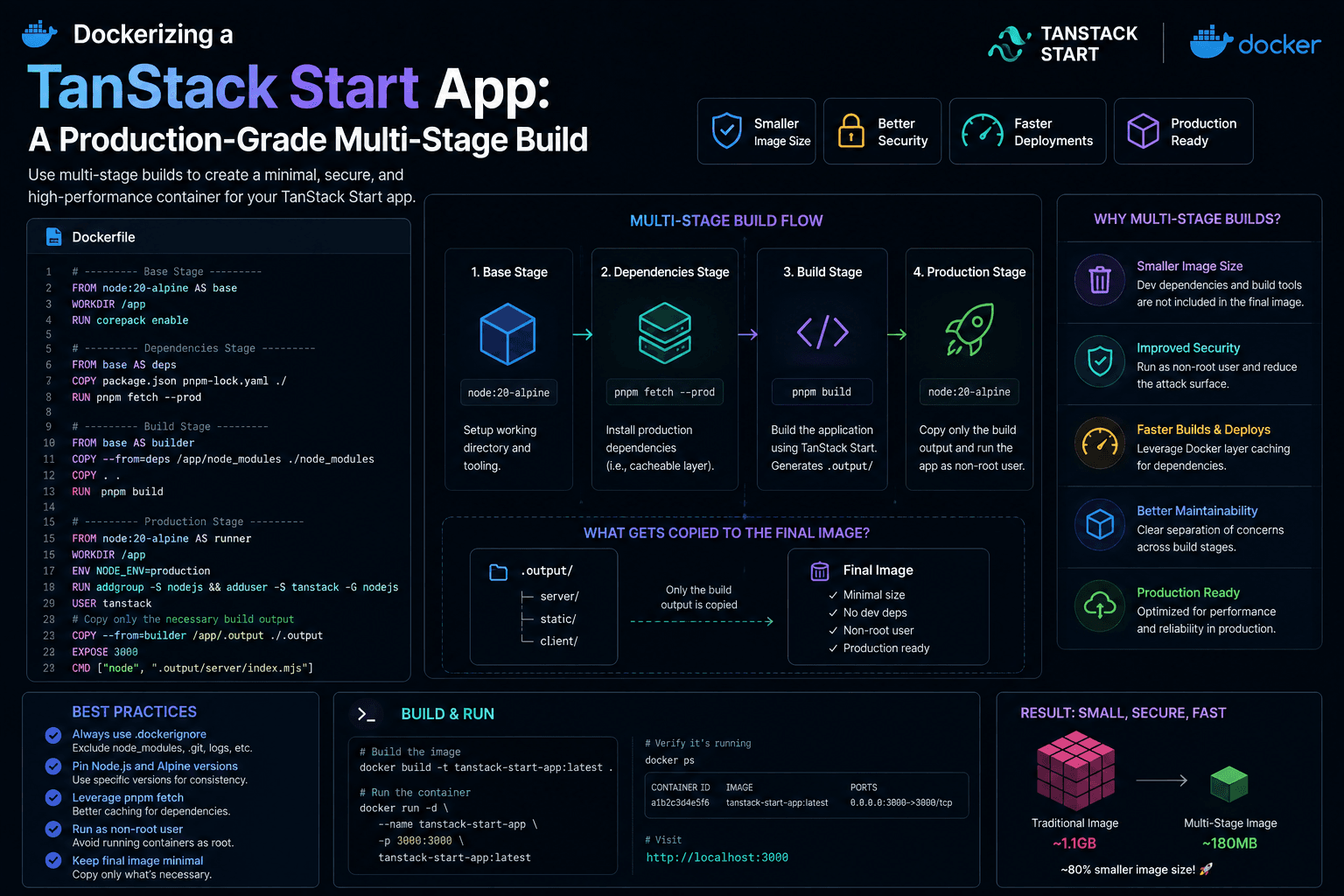
The four-stage shape
1FROM node:24-alpine AS base
2# shared setup: pnpm, working directory
3
4FROM base AS deps
5
6# install dependencies only — cached independently of source changes
7
8FROM base AS builder
9
10# copy source + deps, run the actual build
11
12FROM node:24-alpine AS runner
13
14# copy only the build output + production node_modules
15
16
Each stage exists to isolate something that changes at a different rate, so Docker's layer cache actually helps instead of getting invalidated on every commit:
depsonly depends onpackage.jsonand the lockfile. It rebuilds only when dependencies change — not on every source edit.builderdepends on the full source tree and produces the build artifact. This layer rebuilds often; that's expected and fine, because it's not the layer that ends up in the final image.runnerstarts from a cleannode:24-alpine, not frombuilder, and copies in only what's needed to run the app. None of the build tooling, dev dependencies, or source files that were needed to produce.outputend up in the image that actually runs in production.
Pinning the base image
node:24-alpine, not node:alpine or node:latest. Floating tags are the
kind of thing that works fine for months and then breaks a build on a
Tuesday because the underlying Node minor version shifted under you with no
corresponding change in your repo. Alpine specifically buys a much smaller
base image than the Debian-based node:24 — worth it for a runner image
where every extra layer is something that ships to production and needs to
be pulled on every deploy.
corepack enable in the base stage is what makes pnpm available without
installing it as a separate dependency — Node ships Corepack, and enabling
it activates whichever package manager the project's packageManager field
in package.json specifies, at the exact version pinned there.
Installing dependencies correctly
1FROM base AS deps
2
3COPY package.json pnpm-lock.yaml ./
4
5RUN pnpm install --frozen-lockfile --ignore-scripts
Two flags matter here beyond the obvious "install dependencies":
--frozen-lockfilefails the build instead of silently updating the lockfile ifpackage.jsonandpnpm-lock.yamlhave drifted apart. In CI and Docker builds, that's the behavior you want — a mismatched lockfile should be a build failure caught immediately, not a silent dependency upgrade baked into a production image.--ignore-scriptsskips arbitrarypostinstallscripts from dependencies during this layer. Since this is a build environment building an image that will be deployed, running third-party install scripts here is unnecessary surface area — most packages that need a postinstall step for actual functionality (native bindings, etc.) are handled at build time anyway, and this flag limits what a compromised or malicious transitive dependency can do duringpnpm installin CI.
Copying only package.json and the lockfile — not the full source — before
running install is what makes this layer cacheable independently of source
changes. Change a component file, and Docker reuses this entire layer from
cache instead of reinstalling every dependency.
Build-time ARGs for Vite environment variables
This is the part that trips people up. Vite env vars have to be available
at build time, inside the builder stage, as build arguments —
ENV alone on the running container does nothing for a bundle that was
already built and baked into static files.
1FROM base AS builder
2
3COPY /app/node_modules ./node_modules
4COPY . .
5
6ENV NODE_OPTIONS=--max-old-space-size=4096
7
8ARG VITE_API_URL
9ARG VITE_APP_URL
10
11# ...other VITE_ args
12
13ENV VITE_API_URL=$VITE_API_URL
14ENV VITE_APP_URL=$VITE_APP_URL
15
16# ...
17
18RUN pnpm buildThe ARG → ENV pairing is deliberate, not redundant: ARG makes the value
available to instructions inside this build stage, and re-exporting it as
ENV makes it visible to the pnpm build process the same way it would be
if you'd run vite build locally with a .env file loaded. docker-compose
or your CI pipeline passes the actual values in as --build-arg (or the
args: block in Compose), sourced from whatever secret store or .env file
that environment uses.
NODE_OPTIONS=--max-old-space-size=4096 is there because Vite/Rollup builds
on larger apps can hit Node's default heap limit inside constrained CI
runners — worth setting explicitly rather than debugging an
out-of-memory build failure that only reproduces in CI.
The practical consequence: if you need a different VITE_API_URL for
staging versus production, that's a different image build for each — not
the same image with different runtime environment variables. This is
different from how most backend services are typically deployed, and it's
worth making sure whoever owns the deploy pipeline knows it.
The runner stage: what actually ships
1FROM node:24-alpine AS runner
2
3WORKDIR /app
4
5ENV NODE_ENV=production
6
7COPY /app/node_modules ./node_modules
8COPY /app/.output ./.output
9
10EXPOSE 3000
11
12CMD ["node", ".output/server/index.mjs"]Two COPY --from instructions are doing all the work: production
node_modules from deps (not builder, which could in principle include
extra dev-only side effects depending on your install setup), and the built
Nitro server output from builder. No source files, no pnpm, no build
tooling — the runner stage never even installs pnpm, because it doesn't need
to run any package manager command at all.
ENV NODE_ENV=production here matters for the server runtime — Nitro and
any server-side code that branches on NODE_ENV behaves correctly — and is
unrelated to the VITE_ build-time variables above, which is exactly the
distinction worth keeping straight.
Wiring it up with Compose
1services:
2trading-fe:
3  build:
4    context: .
5    dockerfile: Dockerfile
6    args:
7      VITE_API_URL: ${VITE_API_URL}
8      VITE_APP_URL: ${VITE_APP_URL}
9      # ...
10  ports:
11    - "3000:3000"
The args: block under build: is what forwards host-side environment
variables (typically from a .env file Compose reads automatically) into
the image as build arguments — the same mechanism as docker build --build-arg, just declared once instead of passed on every invocation. Any
variable the app needs at runtime instead of build time (a database URL
for a backend service, for instance) would go under environment: on the
service instead — a different mechanism for a different lifecycle.
Trade-offs
Alpine vs a slim Debian base
Alpine images are smaller, which matters for pull time and image storage cost. The trade-off is musl libc instead of glibc, which occasionally causes subtle issues with native Node addons that expect glibc. For a TanStack Start app with a typical dependency set, this is rarely an issue in practice — worth testing once per project, not assuming universally safe.
Rebuilding per environment vs runtime config injection
Baking VITE_API_URL in at build time means a genuinely different image per
environment. Some teams instead fetch runtime config via a small
/config.json endpoint the client loads on startup, keeping one image
across environments. That adds a request and a layer of indirection in
exchange for a single build artifact promoted through environments — a
reasonable trade for teams with strict "build once, deploy everywhere"
requirements, but more infrastructure than most projects need.
Copying node_modules from deps vs a fully bundled server output
Some Nitro presets can produce a more self-contained server bundle that
needs fewer node_modules copied in. Copying full production node_modules
from the deps stage is simpler and more predictable across presets, at the
cost of a slightly larger runner image than a fully bundled alternative
would produce.
Common mistakes
- Setting
VITE_*variables as runtimeenvironment:instead of buildargs:— the client bundle silently keeps whatever value (orundefined) was present at build time. - Using a floating base image tag (
node:alpine,node:latest) instead of a pinned major version, causing builds to break without a corresponding code change. - Copying the full source tree into the
depsstage, defeating the dependency-layer cache — every source change forces a full reinstall. - Building the runner
FROM builderinstead of a clean base image, shipping build tooling and dev dependencies into production. - Forgetting
--frozen-lockfile, letting a Docker build silently resolve different dependency versions than what's committed. - Not setting
NODE_ENV=productionin the runner, missing framework and library optimizations that key off it.
Practical recommendations
- Split
deps,builder, andrunnerinto separate stages, and build the runner from a clean base image, not frombuilder. - Pin the Node major version in
FROM, and revisit it deliberately rather than letting it float. - Pass every
VITE_-prefixed variable as a buildARG, re-exported asENVinside thebuilderstage only — never expect the running container to supply them. - Use
--frozen-lockfilein CI and Docker builds so a lockfile mismatch is a build failure, not a silent version drift. - Keep
.dockerignorecurrent (node_modules,.output,.env*) so local artifacts and secrets never get copied into the build context by accident. - If you need one image across multiple environments, evaluate a runtime config endpoint instead of rebuilding per environment — but only if that requirement is real, not speculative.
Conclusion
Most of what makes a TanStack Start Dockerfile different from a generic Node Dockerfile comes down to one fact: Vite's client-side environment variables are compiled in, not read at runtime. Once that's internalized, the rest of the Dockerfile is standard multi-stage discipline — cache dependency installs separately from source changes, build in one stage, run from a clean minimal image, and never ship what you don't need to run the app.
Get the ARG/ENV split right for the build stage, and everything else —
image size, cache efficiency, deploy repeatability — falls out of applying
the same multi-stage habits you'd use for any other Node service.